Back to ArticlesBack

Join 50,000+ PM Professionals

Get expert PM insights, PMP prep tips, and earn PDUs with exclusive content delivered weekly.

Protected by reCAPTCHA: Privacy & Terms

MPUG - Master Project User GroupMPUG

Milestones are an important part of any project. They show important achievements in a project, which can be used to communicate high level progress to senior management.

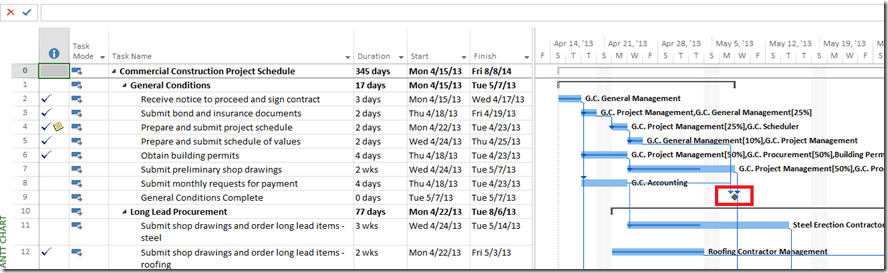
Gantt chart in Microsoft Project gives us a graphical representation of the task/project status. Tasks are represented by bars that graphically display progress. Milestones are represented by diamonds, but since they are 0 days tasks, there is graphically no progress displayed. Fortunately there is an easy way to fix this.

Open your project in Microsoft Project. (The screenshots are from Microsoft Project 2013, but the same steps apply to Microsoft Project 2010).
Parthiv_1

As you can see, looking at the Milestone in Gantt chart does not provide any information related to status of the milestone.

To add Percent complete –

  1. Click on the Format Tab
  2. Under the ‘Bar Style’ section of the ribbon, click on Format –> Bar StyleParthiv_2
  3. From the Bar Style dialog box, Select ‘Milestone’ and then click on the Text tab at the bottom.
  4. Click on the Drop Down menu next to ‘Right’ and select ‘%Complete’ and then click ok.Parthiv_3

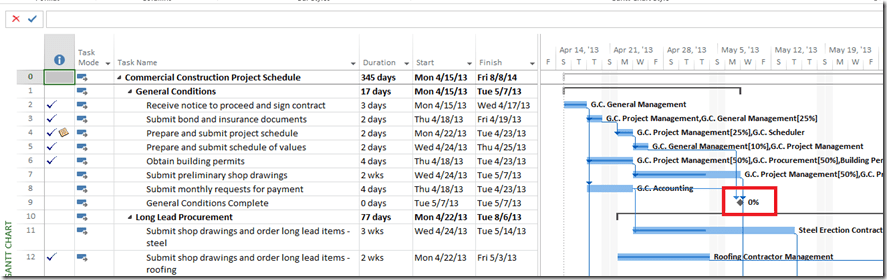
Now if you go back to the Gantt Chart, you will see the %Complete next to the Milestone icon.
Parthiv_4

Note: Milestone should always be either 0% or 100%.

Get Weekly PM Insights

Join 50,000+ PMs receiving updates on the latest PM methodologies, PDU opportunities, tool reviews, career tips, and member exclusives.

Protected by reCAPTCHA: Privacy & Terms

PMI ATP
PMI Authorized Training Partner
REP #4082

Learning Paths

PMP® TrainingCAPM® TrainingPgMP® TrainingPMI-ACP® TrainingMS ProjectMS PlannerMS TeamsJira

PM Resources

PDU TrackerLive WebinarsSalary CalculatorTool ComparisonsJob BoardKnowledge BasePM GlossaryOur Faculty

Community

Discussion ForumStudy GroupsEvents Calendar

Follow Us

LinkedInYouTubeTwitterFacebook
MPUGMaster Project User Group

© 2026 MPUG. All rights reserved.

TermsPrivacySitemapAdvertise
Project Management
Microsoft Project
Best Practices
Productivity
P
Parthiv Bhuta

Content Writer

Parthiv Bhuta is a Consultant and Trainer at EPMA with an MBA from University of Houston. He has been using Microsoft Project and Project Server since version 2003. He is a Microsoft Certified Professional and working towards getting a certification as a Microsoft Certified Trainer. Visit his blog and connect with Parthiv on LinkedIn or Google+.

View all articles by Parthiv Bhuta
Articles

Adding % Complete to Milestones in the Gantt Chart

Milestones are an important part of any project. They show important achievements in a project, which can be used to communicate high level progress to senior management. Gantt chart in […]

1 min read
•almost 13 years ago•Updated 7 months ago•
P
Parthiv BhutaAuthor
Related Content

Continue Reading

Discover more insights and articles that complement your current reading

monday.com AI Workflows Now Pause for Human Approval
Articles
1 min read

monday.com AI Workflows Now Pause for Human Approval

MPUG Editorial · August 26, 2026 · ~4 min read · Category: PM Platforms monday.com AI Workflows can now stop mid-run and wait for a person to say yes. The […]

A
Anonymous
6 days ago
Read
Ask Gemini in Google Chat: An AI Command Line Aimed Squarely at Status Chasing
Articles
1 min read

Ask Gemini in Google Chat: An AI Command Line Aimed Squarely at Status Chasing

MPUG Editorial · August 25, 2026 · ~5 min read · Category: Productivity Tech Starting August 26, 2026, Ask Gemini in Google Chat puts a single prompt box inside the place most […]

A
Anonymous
6 days ago
Read
Copilot Meeting Prep Lands in Classic Outlook for Windows
Articles
1 min read

Copilot Meeting Prep Lands in Classic Outlook for Windows

MPUG Editorial · August 24, 2026 · ~4 min read · Category: AI & Copilot Copilot meeting prep — the feature that assembles context, action items, and documents before a […]

A
Anonymous
8 days ago
Read
Explore All Articles