


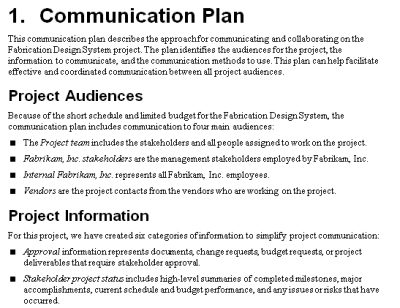
 For small projects, communication can be quite simple. Communication for the project of heading home after the holidays might be no more than “Call us when you get there.” But good communication grows complex as the scope of the project increases, more people are involved, and teams are scattered around the world. For example, a conference call that includes people in Europe, Asia, and North America is going to keep someone up late and get someone else up early, and you don’t want to make those decisions at the last minute. By planning your approach for communication in advance, you can provide the right information to the right people, at the right time, in the right format, and with the right emphasis. Your road map is the project communication plan, illustrated by the first page of a sample communication plan in Figure 11-1. This section describes the components of a communication plan, how you choose the communication methods appropriate for your project, and how to create a communication plan.
Project File: A sample communication plan, Communication_Plan.docx, is available in the Chapter 11 folder on the companion website. See below for instructions.
Figure 11-1. A communication plan can be as simple or as sophisticated as your project requires for delivering information to the people who need it.
Who Needs to Know?
The first step to creating a communication plan is identifying who needs to know something about the project. Stakeholders are obvious audiences for project communications, but other groups often need or want project information. As you build your communication plan, ask stakeholders and other groups you’ve identified as audiences if there’s anyone else who needs to know something about your project. Here are some typical audiences, both stakeholders and ancillary groups, you might include in a communication plan:
- The project team is the core of communication. Team members work on the project every day. They need to know what’s going on with the project, but they also contribute a lot of the information that you communicate to others.
- Management stakeholders aren’t dedicated to the project, but they make key decisions about it. Management stakeholders share similar needs for project communication and can include customers, the project sponsor, a steering committee or leadership team, members of the change management board, functional managers, and so on.
Note: The customer is part of the management stakeholder group, but often wants different information delivered in different ways.
- The project sponsor is also part of the management stakeholder group, but is usually involved more intimately with the project. For example, you might send the project sponsor the same information that you provide to other management stakeholder groups, but also meet face to face for in-depth discussions.
- Supporting groups might be involved in your project from time to time and need to know specific information. For example, sales and marketing might want to know what the product features are and when it’ll be ready to sell. The legal department gets involved only to work on contracts or to review documents for legal issues. Other supporting groups include operations, manufacturing, IT, and other departments.
- External audiences can be very involved in your project. For example, vendors, suppliers, partners, and the project managers who work for them can belong to your core team. However, you typically don’t tell external audiences as much as you do internal team members. For example, if you’re trying to resolve issues, you’d include external audiences in those discussions only if they are directly affected. Investors and regulatory agencies (such as the IRS or a public utility commission) might represent additional external audiences. For these audiences, the format and schedule of communication is often already specified, such as the financial statements that the SEC requires.
Tip: As you develop your communication plan, the golden rule is to give the audience what it wants. Just as a Gantt chart might make perfect sense to you and not one whit to the customer, the methods of communication you choose must actually get the message through to your audience. And if that means you have to prepare a Microsoft PowerPoint presentation for the steering committee, a Microsoft Excel spreadsheet for the accounting department, a Microsoft Word document for project teams, and a Microsoft SharePoint site for the developers, so be it. After all, your job as project manager is to make the project a success, and communicating information successfully is a big part of that.
Best Practices: It’s better to send information to too many people than too few, suggests Ron Taylor, founder of the Ron Taylor Group and PMI’s 2008 Leader of the Year. Mr. Taylor’s approach is to give people the opportunity to opt out of receiving specific types of information. However, opting out has one downside that he makes sure everyone understands up front. To make sure responsibility lies where it belongs, anyone who opts out of receiving communications must abide by decisions that are made without their input.
What Do You Communicate to Audiences?
Sad but true, people hear only what they want to hear. Your customer might care deeply about the return on investment (ROI) of the project, but using ROI to inspire team members to complete their tasks more quickly probably won’t deliver the results you’re hoping for. For all audiences that you’ve identified, the next step is to determine what they need to know, what they want to know, and what information you want to tell them. For example, the customer, project sponsor, and management stakeholders need status reports, but they also want information about the project strategy and issues and risks that might affect the business objectives for the project. Functional managers need status information in order to plan their people’s time.
Usually, you want to distribute some information that audiences don’t think to ask for. For example, you communicate the benefits of your project, the problem statement, and the project objectives to everyone involved, even though team members might want to know only what their task assignments are. For another example, if a project is going to change how processes in your organization are going to work, you can begin to tout the benefits of the changes.
You can categorize project information in different ways. For example, you might categorize information based on what different groups need to know: planning, day-to-day detailed status, high-level status, and general information. You might also categorize information by whether it’s required, desired, or merely for reference. This section describes information you typically communicate in projects and then categorizes it by the groups that use it.
Tip: Keep track of each type of information that you provide to each audience because the distribution method and timetable you choose may vary based on the information. For example, you might distribute project status every week while the stakeholders want a thorough financial update once a month.
Types of Project Information
The information that you communicate varies depending on whether you’re planning, executing, or closing the project. Here are types of project information that you distribute by phase in a project:
Project planning: The components of the project plan help people involved with the project understand the purpose of the project and their roles in completing it successfully. From the problem statement to the schedule and the communication plan, each component describes how you plan to run the project. Some audiences review planning documents in detail and approve them, whereas other groups use them simply as direction for the work they perform.
Project execution and control: Once the plan is approved and you begin to execute that plan, people need to know the rules. You have to provide people with procedures, such as reporting time and expenses, requesting time off, escalating issues, and so on. For most of the project duration, people need to know the status of the project and what’s planned for the near future.
The status you provide varies by the needs of the audience. For example, the elegant programming shortcut that is helpful and fascinating to the development team would put management stakeholders to sleep. On the other hand, the financial measures that the management stakeholders can’t live without would be equally boring to most technical folks.
Project closure: You wrap up projects with reports that summarize the performance of the project.
Project publicity: Regardless of the phase a project is in, you want to build enthusiasm and commitment for it. Publicizing a project early on might include announcements in the company newsletter, contests to name the project, or road shows that describe the purpose and benefits of the project. During project execution, you might use a project newsletter to publicize accomplishments, host celebrations upon completion of significant milestones, or distribute pens or coffee cups emblazoned with the project logo. And nothing beats meeting stakeholders and team members one-on-one to build commitment.
Management Stakeholders
Management stakeholders, including the customer, project sponsor, and other high-level stakeholders, typically care about the overall business goals of a project. Early on, they evaluate the project plan to ensure that it meets their needs. During project execution, they frequently review performance, such as how much progress has been made, how much money has been spent, and the quality of the results that have been achieved. Most of the time, they don’t want to know the details, although they will for significant issues, such as someone absconding with project funds.
Note: As internal customers, company executives often require more detailed project information than external customers. They must evaluate project performance compared to the entire portfolio of the company’s projects and business objectives.
Here is some of the information that management stakeholders want to receive:
The project plan: During planning, management stakeholders must ensure that the proposed plan satisfies their needs. Later, if requirements or criteria change, these stakeholders revisit the project plan while negotiating change orders, contract revisions, or modifications to the Project Goals.
Project status: Executive summaries of project status focus on high-level performance and accomplishments. Management stakeholders want to know about major milestones that have been completed, summaries of costs and schedule performance (the project is one month behind schedule and $20,000 over budget), and major issues and risks that could prevent the project from achieving its goals. If you are measuring other aspects of project performance, such as lines of code written or statistics about defects found and fixed, they want to know whether the metrics are good or bad and about the trends in performance.
Financial information: These stakeholders understand and care about the financial measures for projects, so they want to know the current financial results, including performance compared to the budget and other metrics, such as ROI.
Change requests: Some management stakeholders need to know about change requests. For example, the customer, project sponsor, and members of the change management board must evaluate change requests to see whether they should be approved or rejected.
Tip: Executives plan for the long term, so they also want to know what is in store for the project in the future. Is the project going to deliver on time and under budget Will it deliver the financial results they want Will it achieve its objectives Or are changes necessary?
Functional Managers
Functional managers usually provide the people who perform the project work, so they need to see project plans to understand the skills required, to know when their people are needed, and to be aware of any constraints, such as cost or availability. Once people are working on assignments, functional managers want to know how much longer those people are needed or might ask if they can substitute someone else.
Here is typical information you might communicate to functional managers:
Project plan: During planning, functional managers must understand the big picture of the project, but they focus on work packages, the skills needed, and when assignments are scheduled to occur.
Project status: Functional managers need to know when their people will be done with their assignments, so they can line up more work for them in the future.
Team Members
Initially, team members must understand the work they are supposed to perform as well as how that work fits into the big picture of the project. This information helps them make good decisions in their day-to-day work. As work progresses on the project, team members need to know detailed status about completed work and the work that’s scheduled for them in the near future. Here are some types of information that team members need:
Assignments: Team members want to know what work they are supposed to do and when.
Status: Team members need to know the status of their work and related tasks. With status updates, team members can collaborate with their colleagues and help devise solutions to problems.
Issues: Team members need to know about issues that might affect them, proposed solutions, and how closed issues were resolved.
Lessons learned: Team members can work more effectively if they can take advantage of tips, shortcuts, or practices to avoid.
Decisions: Team members must know about any decisions that affect the direction or objectives of the project, so they can conform to the new guidelines.
What Communication Method Should You Use?
The last step to developing a communication plan is to determine the best methods for getting each type of information to your audiences. You must decide how often audiences need information, the best method for delivering information, and the best format in which to deliver it. For example, everyone involved in the project needs a project status report, which you might distribute via email to the entire team but review in a meeting with stakeholders. Your organization’s executive team meets once a month and wants an executive summary of project status with emphasis on the budget and financial measures. The project sponsor prefers to meet in person to review status, issues, and risks. And team members have asked you to distribute the detailed status reports of team accomplishments every week.
Communication methods come in many guises and each one has its advantages and disadvantages. For example, face-to-face communication is best for delicate discussions or to brainstorm solutions. Conference calls and email come in handy for teams that are distributed geographically. Documents in paper or electronic format are ideal for communicating large amounts of information that require study. Here are some considerations for communication methods:
Status reports: These can contain different types of information depending on the audience. Moreover, whether you produce paper or electronic status reports depends on the audience as well. Sending status reports to people makes it easy for them to read the information, and they can choose to scan the reports for pertinent topics or ignore them if time is at a premium.
Note: When you distribute documents electronically, you have to consider the software formats that your audiences can read. For example, if some team members have older versions of Word, you might choose to distribute reports in Adobe Acrobat or Microsoft XPS Document Writer format. Don’t forget that most people in your audiences won’t have Microsoft Project, so you should save Gantt Charts and other Project views as pictures, PowerPoint files, or web pages.
Meetings: These can vary from one-time kickoff meetings to daily meetings of small groups of team members, weekly or monthly executive updates, or occasional all-hands meetings. Although you can’t guarantee that people will pay attention in a meeting, getting people in the same room is ideal for discussions, brainstorming, and decision making.
You have options for how you deliver information in face-to-face meetings. For example, an executive update meeting might start with a presentation of project status followed by an energetic discussion. Other meetings, such as lessons learned sessions, can be completely dedicated to group discussion.
Conference calls and videoconferencing: These are options for meetings when people are distributed geographically; however, they are not ideal if you are working through issues or dealing with a team that is “storming.” In situations in which tension is high, a videoconference or Microsoft Office LiveMeeting provides more effective interaction.
Sending documents to people: This is preferable if you want the recipients to take action. For example, if you want stakeholders to review and approve your project plan, you should send the plan to them for review. However, the best way to obtain approval and signatures is to hold a meeting.
Storing documents: This is a reasonable solution for information that only some people need only some of the time. For example, you can store any document-based deliverables, such as the current project plan, requirements, specifications, change requests, and other project information in a shared folder, on a web page, or in a shared workspace. People who need the information can retrieve it when they need it.
Newsletters and email distribution lists: These work well for announcements and other information you want to disseminate to broad audiences. You can distribute information to many people without much effort, but the readers can skip the message if it doesn’t apply to them.
Note: Many companies use products/services like Microsoft Teams, Slack, or online project management tools. These tools are great for corralling project information and communication in one place. Be sure to use the features in appropriate ways. For instance, don’t post status reports in the chat. Keep them in the doc storage area.
Resolution Is What’s Important
If you want someone to do something, sending an email or leaving a voice message is not the same as getting something done. If you have an issue that’s delaying your project, you can’t afford to wait until the person you contacted decides to act. The most effective way to obtain a response to a request is to tell people up front what you want them to do and when. For example, an email that scrolls for pages before you get to the point will be deleted long before the recipient knows what you’re asking for. Put requests in the first paragraph of an email, memo, or other written communication. State requests in the first sentence of voice messages. You can follow up with the why’s and how’s after that.
After you’ve sent requests for action, you must follow up if you don’t receive a response when you expect. If a return email doesn’t arrive, follow up with another email or a telephone call. (Emails get caught in spam filters all the time, so don’t begin your follow-up with an accusation.) If a voice message goes unanswered, find the person or someone else who can help.
Some folks don’t respond no matter what you do. One way to coax responses from people who do that is to tell them what you plan to do if you don’t hear from them by a specific time or day. If your contingency plan is something you know they don’t want, you’re almost guaranteed to receive a response when you need it. For example, “Hi, Dale. I really need the graphic for the brochure by tomorrow morning at 9:00 A.M. If I don’t have it by then, I’m going to use the photograph of the meerkat. Thanks for your help.” If someone still doesn’t respond, diplomatically escalate your request. If you do ask for help, it’s a good idea to tell the managers you ask what you would like them to do. Otherwise, they might apply more pressure than you intended. Of course, you must be willing to go with the picture of the meerkat if you still don’t get a response.
When you choose communication options, opt for the ones that get information to audiences with the least amount of effort. For example, don’t send hard copies of status reports if everyone on the project checks email every day. An email distribution list is much easier than printing and distributing dozens of hard-copy memos. However, for some information, such as reports that government agencies require, you have to use their format and transmission methods.
Tip: Although the ideal approach is to provide every audience with exactly what they want, some communication methods can be extraordinarily time-consuming. If communication demands threaten to consume every workday, try suggesting to stakeholders alternatives that require less time.
Building a Communication Plan
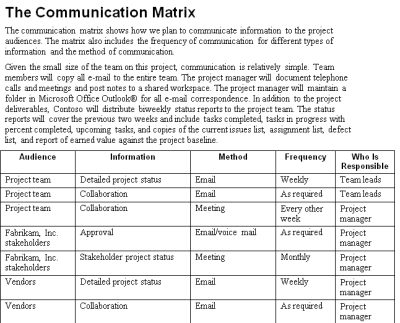
The communication plan begins with sections that list the audiences for the project, the information you plan to communicate, how you will compile the information, and the communication methods you plan to use. But the heart of the communication plan is a matrix that shows how you plan to communicate information to each project audience, as illustrated in Figure 11-2.
Figure 11-2. A matrix like the one included on page 2 of the sample communication plan is helpful for showing the information you communicate to audiences and the methods you plan to use.
Tip: Although the communication plan is often a part of the project plan, it’s a good idea to publish the communication plan as a stand-alone document. That makes it easy to keep a copy handy for quick reference.
Project Status Reports
Project status reports keep people informed about the progress that’s being made on your project and what’s happened in the recent past. These reports are important and can be chock-full of information, but brevity is a virtue. The key to reporting project status is to be concise while still delivering information that people need or want to hear.
Here are some guidelines for producing effective project status reports:
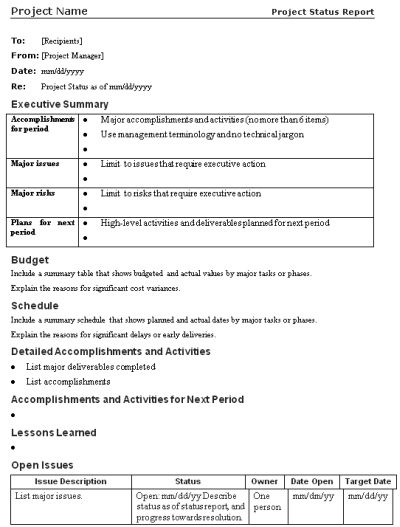
Use a standard format: The people in your audience can find the information they need more quickly if you deliver project status in the same format each time, as demonstrated by the project status report template in Figure 11-3. Develop a template for your project status report and include notes about how to fill it in.
Figure 11-3. By using a template for your project status report, you won’t forget to include important information, and readers can find the information they need more easily.
Begin with a project status summary: Key stakeholders appreciate a summary of status, so they can decide whether they must review the entire report in detail. Include major accomplishments, issues, risks, and plans for the next period.
Review the budget and project schedule: Summarize the budgeted and actual costs and the planned and actual dates for the status period, and explain significant variances (more than 10 percent).
Note: As project manager, be sure to define the meaning of significant variance during project planning. A 2 percent variance on the backyard remodel project might be insignificant. The same 2 percent variance could be catastrophic if your project has a hard deadline.
Focus on accomplishments: Achieving goals and handing over deliverables is more important than the detailed tasks that led up to them. Publicize successes, such as effective practices, shortcuts, clever solutions, and so on.
Document lessons learned: By publicizing effective techniques or ill-advised approaches, other team members can be more productive.
Report the status of significant issues and risks: Describe the progress made toward resolving issues and managing risks during the last status period. Identify issues that have been closed and risks that have been successfully resolved. Also, document the risks that were avoided by implementing plans to circumvent those risks or because the work packages that were at risk have been delivered without issue.
Create and distribute status reports on schedule: If a status report isn’t important enough for you to send it out on time, your readers might not consider it important enough to read.
Best Practices
Poorly written project status reports can raise more questions than they answer. Here are some tips for producing status reports that truly inform your audience:
- If you include activities that are in progress, also include when they will be complete.
- Include the results of meetings, discussions, training sessions, and so on.
- Include specific, quantitative results. Use numbers rather than terms, such as few or numerous.
- Take the time to correct typographical errors and grammatical errors.
- Proofread the report for errors that Word doesn’t catch.
- Include links to a project repository, so readers who want more information can locate it without calling you.
To download the companion content referenced in the text, visit The Microsoft Press Store and click on Downloads in the middle of the page.
From Successful Project Management: Applying Best Practices and Real-World Techniques with Microsoft Project by Bonnie Biafore, published with the authorization of Microsoft Corporation by O’Reilly Media, Inc., 1005 Gravenstein Highway North, Sebastopol, CA 95472. Copyright 2011 by Bonnie Biafore.
Purchase Successful Project Management: Applying Best Practices and Real-World Techniques with Microsoft Project by Bonnie Biafore here.
Related Content
Webinars (watch for free now!):
Leveraging Project, Project Server and Project Online for Better Communications
The Basics of Schedule Planning – It’s ALL about Communication
Articles:
Communication: 5 Ways to Improve Your Project’s Lessons Learned
Size Matters (in Plan Communications)



Cynthia Trotta
Cannot find the companion link described here, “To download the companion content referenced in the text, go to the O’Reilly book site and click on Companion Content in the left column. Choose Chapter 11.” Please provide a link to the site.
Bonnie Biafore
Hi everyone,
Microsoft Press switched the distributor for this book. The companion content is now available at:
https://www.microsoftpressstore.com/store/successful-project-management-applying-best-practices-9780735649804
Bonnie
Chris R
Thanks Bonnie. As always, a very good article. In the battle over “too much or too little”, one approach is to determine “push” and “pull” information. The PM’s status report can “push” to the targeted audience, providing just the summary line of information. Details for those who want it can be provided with a link, allowing them to “pull” details from SharePoint or a web page. Keeps you communications succinct, but allowing for more.
Steve Mauk
Excellent summation of how to build a strong project communication plan. I will be using this information to coach up my team. Thank you
Paulynn Budreau
Wow 27 books in 23 years! You´re a writing rock star! Thank you for the summary and thank you for the Linkedin content.. This information still has some relevance today for the larger corporations. I still use the table format communication matrix.